
Technology update: Upgrade your browser
On Saturday, April 4, several OneAmerica apps and features that you use to do business with us will receive a security update. As a result of this, older browsers will no longer be supported, and you may need to upgrade your browser to continue using these features.
Review the details below to ensure there is no disruption in your online experience with OneAmerica.
Prepare for the change
What features
will be impacted
This security update impacts apps and features that use the iPipeline platform.
The following items, primarily accessed from OneSource Online, may be impacted
if you are using an older browser:
- eApp
- Illustrations
- Forms
- ePolicy Delivery
- Policy Service Request (on OneAmerica.com)
What’s being updated
On April 4, iPipeline will be removing support for Transport Layer Security (TLS) 1.1 and moving to TLS 1.2 only. TLS is an encryption protocol which provides end-to-end security of data sent between internet applications.
Check and upgrade your browser
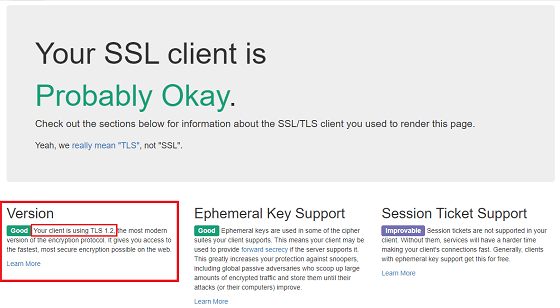
Many internet browsers automatically update and already provide support for TLS 1.2. If you’re using a current version of Chrome, Firefox, Microsoft Edge or Internet Explorer 11, your browser already supports TLS 1.2. Older versions of these and other browsers should be updated immediately. You can easily check your browser by visiting howsmyssl.com and looking in the “Version” section for verification that your browser is using TLS 1.2, as shown below. If not, be sure to update your browser.
Need
assistance?
Reach out to fieldtechsupport.ind@oneamerica.com
if you have questions about this update or need help updating your browser to a
current version.